
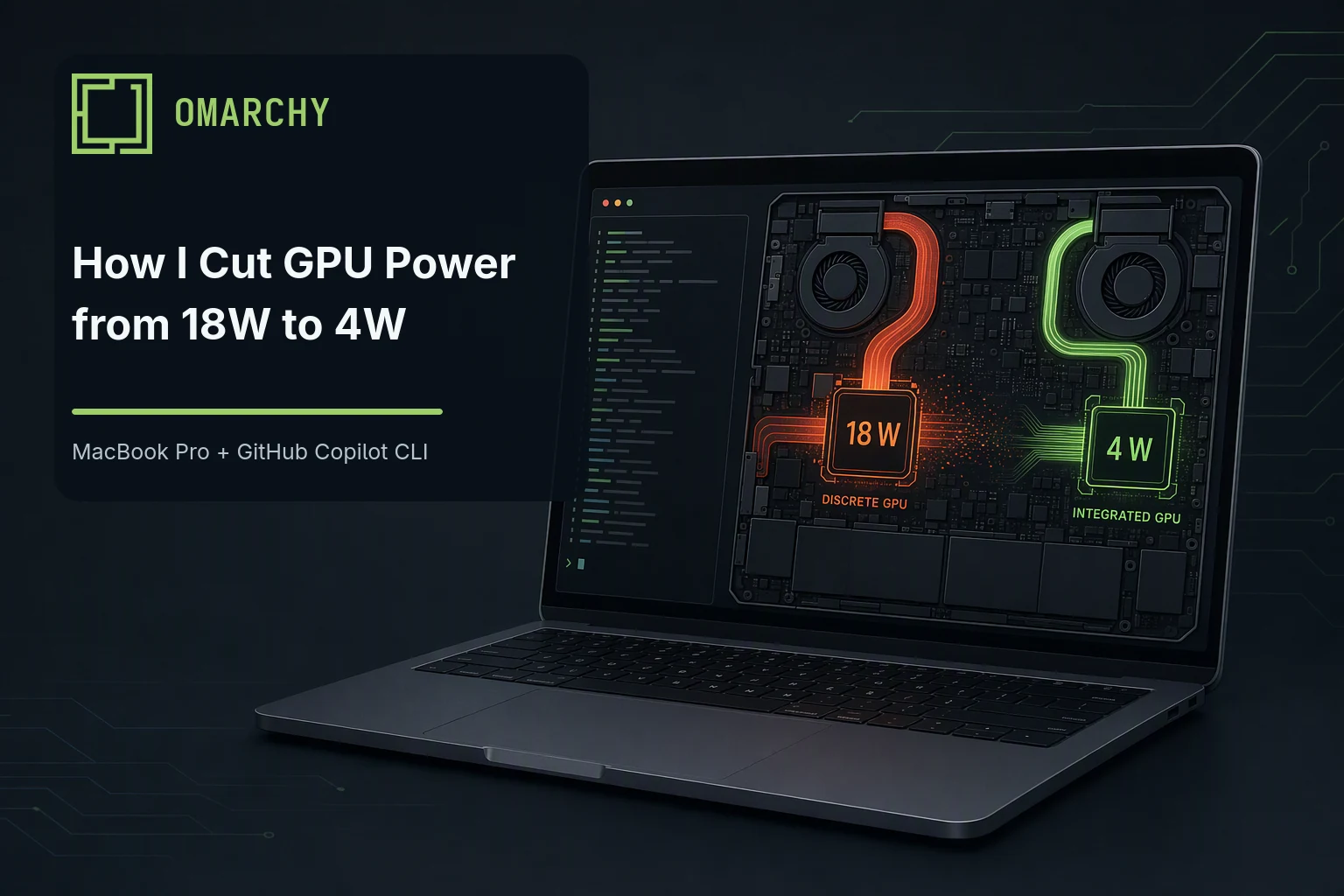
I recently installed Omarchy on a 2019 16-inch MacBook Pro (8-core Intel Core i9-9980HK, 2.4 GHz with a 5 GHz max turbo) and have been learning a lot along the way. I noticed that the machine was running really hot and the battery was draining faster than I expected. While looking into it, I ran across GPU fix notes from GitHub user novuon, who was using the same model and mentioned “dual-GPU energy issues.”
I wasn’t sure what that meant, so I asked GitHub Copilot CLI to investigate it.
I expected a general explanation about integrated and discrete GPUs. Instead, Copilot CLI inspected the actual hardware, checked which GPU Hyprland and my apps were using, and measured the power draw.
What started as a simple question turned into a full troubleshooting session with system changes, two reboots, a few surprises, and a pretty dramatic drop in GPU power usage. Here’s what happened.
The Hardware
This MacBook Pro has two GPUs:
| GPU | Role |
|---|---|
| Intel UHD Graphics 630 | Lower-power integrated GPU |
| AMD Radeon Pro 5500M | Higher-performance discrete GPU |
macOS handles switching between them. On Linux, Apple’s gmux hardware routes the internal display between the two GPUs. Linux’s Direct Rendering Manager (DRM) assigns the graphics devices, while Hyprland chooses which one renders the desktop and AMD’s driver manages the discrete GPU’s power state. That’s a lot of moving parts for what I assumed would be a simple “use the GPU that consumes less power” setting.
To figure out what was happening, Copilot CLI ran several read-only diagnostic commands on the MacBook. Each one answered a different question: Which GPUs and drivers were active? What power profile was the system using? Which applications had each GPU open? What power mode was AMD using, and how much power was it drawing?
Here are a few of the commands it ran:
# List the GPUs and show which kernel driver each one is using.
lspci -nnk

# Show the active system power profile.
powerprofilesctl get

# Find the processes currently using either GPU.
fuser -v /dev/dri/renderD* /dev/dri/card*

# Check the AMD GPU's Dynamic Power Management setting.
cat /sys/bus/pci/devices/0000:03:00.0/power_dpm_force_performance_level

# Read the AMD GPU's average chip-power measurement in microwatts.
cat /sys/class/drm/card2/device/hwmon/hwmon*/power1_average
The commands confirmed that this was a MacBookPro16,1 running version 7.1.8 of the linux-t2 kernel, which includes patches for Macs with Apple’s T2 security chip. They also showed that both the Intel i915 and AMD amdgpu drivers were loaded, which gave Copilot CLI the starting point it needed to trace the power issue.
What Copilot CLI Found
The AMD GPU was marked as Linux’s default VGA device, exposed the connected internal display, and was selected by Hyprland as its primary renderer. Hyprland, Xwayland, Chrome, Ghostty, Telegram, Quickshell, 1Password, and other desktop processes all had the AMD render device open, which gave them access to submit graphics work. An open device alone doesn’t prove that each process was actively using the GPU, but AMD was also reporting 14% activity. The Intel GPU was present without a usable display attached.
The AMD Dynamic Power Management (DPM) setting was also set to auto.
Here’s the initial baseline Copilot CLI captured:
| Measurement | Initial value |
|---|---|
| System power profile | performance |
Default VGA device (boot_vga) | AMD Radeon Pro 5500M |
| Connected internal display | AMD card2-eDP-1 |
| Hyprland renderer | AMD |
| AMD DPM mode | auto |
| AMD reported activity | 14% |
| AMD reported power | 18 W |
| AMD temperature | 67°C |
| Estimated battery health | 84.4% based on full versus design charge |
The laptop was plugged in, so the battery’s charge rate wasn’t useful as a discharge baseline. But an 18 W discrete GPU doing normal desktop work was enough to confirm there was a real problem.
Now that I knew the AMD GPU was doing most of the desktop work, the next question was how to move that work to Intel without breaking the internal display.
Researching the Specific Hardware
I gave Copilot CLI the novuon/mbp2019-omarchy notes I had found. Rather than treating them as instructions to copy, it compared the proposed changes with my hardware, kernel, bootloader, and Hyprland setup.
The fix used four pieces:
- Use the
linux-t2kernel’s downstreamapple-gmux force_igdsupport to route the internal display to Intel. Stock Linux kernels don’t necessarily include this option. - Give the Intel GPU a stable name at
/dev/dri/intel-igpuinstead of pointing Hyprland directly atcard1orcard2. - Tell Aquamarine, the graphics backend Hyprland uses to communicate with displays and GPUs, to use that Intel device.
- Keep the AMD driver loaded, but force the GPU to its
lowperformance level after verifying the Intel display path.
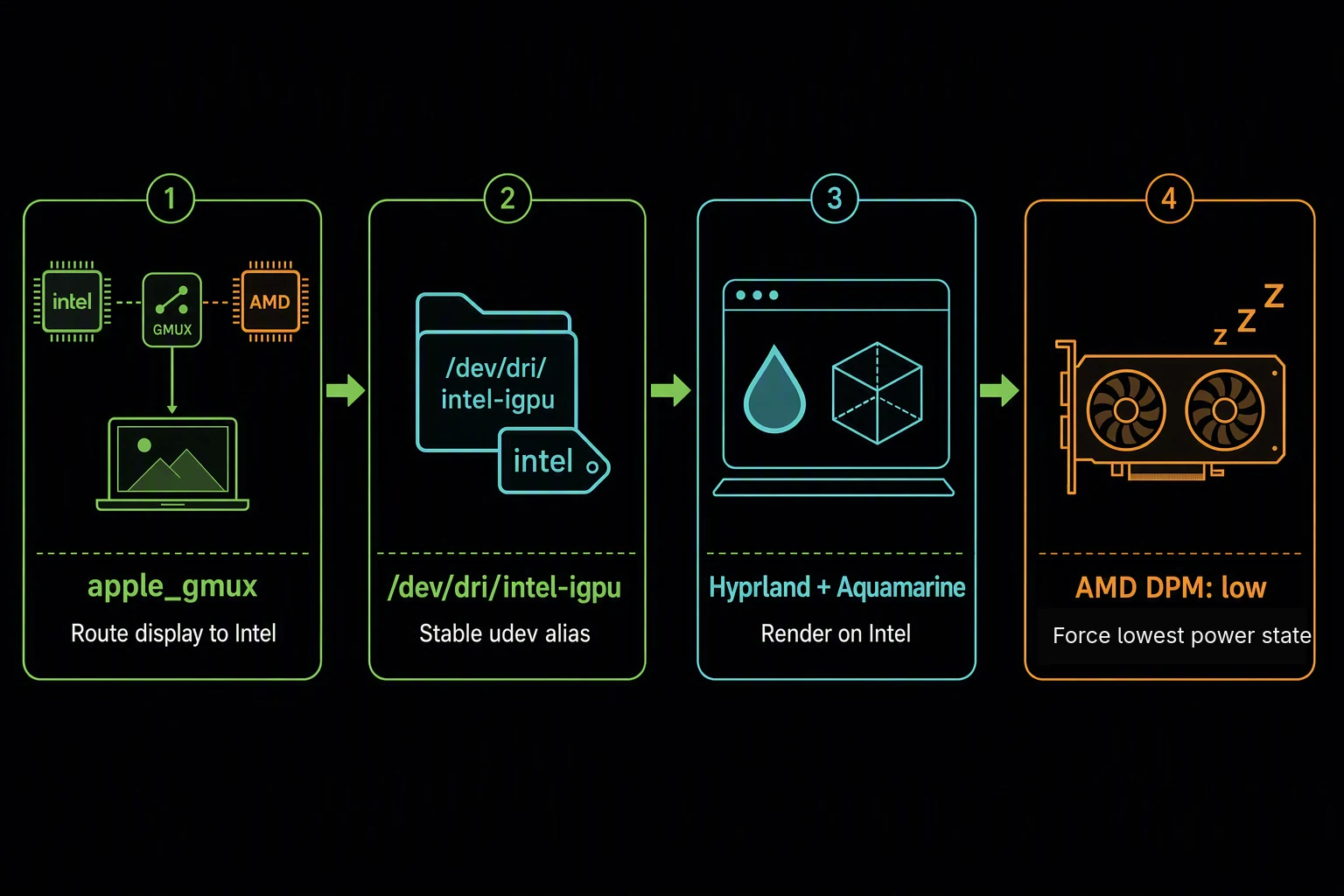
Linux exposes graphics devices under /dev/dri. The two GPUs appeared as card1 and card2, but those numbers can change as devices initialize. A udev rule tied /dev/dri/intel-igpu to Intel’s fixed PCI address, 0000:00:02.0, so Hyprland wouldn’t accidentally select AMD after an update or reboot.
One detail really stood out. In the same-model testing I found, changing AMD’s power mode back to auto after moving the display path to Intel was followed by an unresponsive System Management Unit (SMU), a System DMA (SDMA) timeout, and a GPU reset. The SMU controls GPU power and clock behavior, while SDMA moves data without tying up the graphics engine. That sequence doesn’t prove auto caused the failure or that auto is generally unsafe, but I didn’t want to repeat it on the same model and topology. The proposed startup service, managed by systemd, never writes auto. It also checks the Mac model, AMD vendor and device IDs, PCI address, and final DPM value before it reports success.
I would’ve completely missed that if I’d copied the first generic “Linux dual GPU” solution I found online.
Taking a Staged Approach
The research didn’t prove how USB-C displays, cross-GPU rendering, suspend, or docked-lid use would behave. Changing GPU ownership during boot could also leave me without a working display, so I asked Copilot CLI to follow a staged plan:
- Capture the original state.
- Move the system power profile from
performancetobalanced. - Back up every file that will change.
- Configure Intel as the fixed display GPU and the GPU Hyprland uses to combine application windows into the desktop.
- Reboot once and verify the internal display before touching AMD DPM.
- Apply the model-specific AMD
lowservice. - Test normal use, suspend, battery operation, and external displays independently.
The AMD driver exposes its power setting through sysfs, Linux’s hardware interface under /sys. Reading low back wasn’t enough; power had to fall without breaking the display or recovery path.
Establishing a Safer Starting Point
Copilot CLI started with the lowest-risk change: moving the system profile from performance to balanced. This mainly affects CPU behavior on my machine and is separate from GPU routing.
powerprofilesctl set balancedAMD still used approximately 14 W and reached 75°C. So much for the easy fix. The profile was worth changing, but it wasn’t the source of the GPU problem.
A GPU Reset Had Already Happened
While checking how the graphics drivers initialized, Copilot CLI searched the kernel journal, the system log that records messages from the Linux kernel. It found that the AMD GPU had already performed a mode-1 reset earlier that morning:
amdgpu 0000:03:00.0: MODE1 reset
amdgpu 0000:03:00.0: GPU mode1 reset
amdgpu 0000:03:00.0: GPU psp mode1 reset
That made the issue a lot less theoretical. The GPU wasn’t only using more power than necessary; it had already needed a reset.
The journal also confirmed that the Intel driver initially couldn’t find a usable display:
i915 0000:00:02.0: [drm] Cannot find any crtc or sizesHere, crtc refers to the display-controller resources needed to drive a screen. Meanwhile, the internal panel appeared as card2-eDP-1 on AMD. eDP is Embedded DisplayPort, the connection commonly used for a laptop’s built-in screen. This lined up with the proposed apple_gmux fix: route the internal panel to Intel during startup, then make Hyprland select Intel explicitly.
The Solution Copilot CLI Proposed
GPU routing is riskier than changing a power profile because it affects which device drives the display during boot. Copilot CLI checked the boot process first and found:
- Limine chainloads
/EFI/Linux/omarchy_linux-t2.efi. - That file is a unified kernel image (UKI) containing the Linux kernel and its early-boot configuration.
- Many Linux guides assume GRUB, another bootloader. Following those instructions would’ve changed the wrong part of this Mac’s boot process.
It also verified the pieces the plan depended on:
- Intel was available through the
i915driver, and thislinux-t2build supported the downstreamforce_igdoption. - The UKI’s
modconfhook would include the new module setting during boot. - UWSM could pass the Intel device to Hyprland, while the existing
supergfxdHybrid service would need to be disabled so it didn’t compete with the fixed configuration.
The display-routing part of the plan touched three files:
/etc/modprobe.d/apple-gmux.conf
/etc/udev/rules.d/70-intel-igpu.rules
~/.config/uwsm/env-hyprland
The first selects Intel through Apple’s graphics multiplexer. The second gives the Intel DRM device a stable name, and the third points Hyprland’s Aquamarine renderer to it.
I also had it disable supergfxd during the test. This setup uses one stable Intel-primary configuration rather than switching display ownership between GPUs at runtime.
What This Configuration Trades Away
This MacBook was designed to use both GPUs. Under macOS, Intel handles lighter work to save power, while the system can switch to AMD for demanding graphics or an external display. The goal of this Linux change wasn’t to claim that Intel is always the better GPU. It was to stop AMD from consuming 14–18 W during routine desktop use when I didn’t need its extra performance.
The initial configuration I tested doesn’t reproduce macOS-style automatic switching. It keeps the internal display and Hyprland on Intel, lists only Intel in AQ_DRM_DEVICES, and forces AMD to its lowest performance level. That’s a good fit for browsing, terminals, writing, and typical development work, but it gives up AMD performance for games, 3D rendering, video workloads, and GPU compute. An application could be configured to render on AMD, but it would be throttled while the current low policy is active.
External displays are another important case. The DisplayPort connections on these Macs are tied to AMD, so the Intel-only Aquamarine configuration couldn’t drive a USB-C monitor. I later extended the device list, kept Intel first, and tested the MacBook panel alongside one external LG display. AMD was able to drive it while remaining at low, although the two-GPU path used considerably more total system power than the internal display alone.
A better long-term setup may be to keep Intel responsible for the internal display and explicitly offload selected applications to AMD. That would let AMD handle a game or rendering job without switching the display itself. It would still need a guarded way to raise AMD’s performance level before the application starts and restore low afterward. I haven’t implemented that because the same-model auto transition was followed by a GPU reset, and I want to test the simpler Intel-primary setup first.
Installing the Routing Changes
Before installing anything, Copilot CLI created and checked the three configuration files. It also wrote a rollback script that could:
- remove the Intel gmux option
- remove the stable DRM alias
- remove the Hyprland GPU override
- re-enable
supergfxd - regenerate the boot image
The effective configuration is:
# /etc/modprobe.d/apple-gmux.conf
options apple-gmux force_igd=1
# /etc/udev/rules.d/70-intel-igpu.rules
SUBSYSTEM=="drm", KERNEL=="card[0-9]*", KERNELS=="0000:00:02.0", SYMLINK+="dri/intel-igpu"# ~/.config/uwsm/env-hyprland
export AQ_DRM_DEVICES=/dev/dri/intel-igpuThe rollback script was saved next to this article as copilot-omarchy-rollback.sh.
The install hit a small snag when I dismissed one of the graphical authorization prompts before the Limine image rebuild ran. Instead of rerunning everything, Copilot CLI checked the installed file hashes, service state, and boot-image timestamp. It found that only the image rebuild was missing and resumed there.
After the second authorization, the T2 unified kernel image rebuilt successfully. Before rebooting, Copilot CLI verified the Intel alias and PCI path, the effective force_igd option, the copy embedded in the UKI, the Hyprland device override, and the disabled supergfxd service.
At that point the files were ready, but the display was still running through AMD because apple_gmux makes the switch during boot. The next step was the one planned reboot, followed by verification before changing AMD’s DPM setting.
The Reboot Test
After I approved the reboot, the Copilot CLI session was interrupted as expected. I logged back in, reopened the same session, and told it to continue. It picked up with the task history, draft location, completed steps, and remaining checks intact.
The first kernel result was exactly what I wanted:
apple_gmux: Switching to IGDIGD is the integrated Intel graphics device. Copilot CLI also confirmed that Intel became boot_vga, the internal panel moved from AMD card2-eDP-1 to Intel card1-eDP-1, and Hyprland rendered through /dev/dri/intel-igpu. AMD fell from 14% activity, 18 W, and 67°C to 0%, 4 W, and 54°C. Hyprland still had AMD’s card device open because Aquamarine could detect the secondary GPU, but AMD reported no activity during the sample.
Finding a Second Problem
The switch exposed another problem: a zero-size eDP-2 display on the AMD GPU. Hyprland treated it as a second active monitor even though it had no dimensions, make, model, or usable mode:
Monitor eDP-2:
    0x0@60.00000
This was the phantom AMD eDP connector I had read about. On my machine it made GTK, the interface toolkit used by many Linux applications, repeatedly complain about an invalid monitor scale. Hyprland also created a fake workspace for the nonexistent display.
The first command Copilot CLI tried used older Hyprland syntax and failed because this version reads its monitor settings from Lua configuration files. It checked which monitor options the installed version supports, found the setting for disabling an output, and added:
hl.monitor({ output = "eDP-2", disabled = true })After Hyprland reloaded, only the real eDP-1 display remained active. The kernel could still see the phantom connector, but Hyprland ignored it and the fake workspace disappeared.
Fixing the Power Profile the Omarchy Way
The first reboot also revealed that the system power profile had returned to performance. Copilot CLI traced that to omarchy-powerprofiles-init, which remembers separate settings for AC and battery and defaults to performance on AC. Instead of working around Omarchy, it used Omarchy’s commands to remember balanced for both:
omarchy-powerprofiles-set ac balanced
omarchy-powerprofiles-set battery balanced
The original powerprofilesctl set balanced lasted only until Omarchy reapplied its setting. The wrapper commands survived the next reboot.
Holding AMD at the Low Setting
At this point the desktop was running on Intel, the fake monitor was gone, and the system power profile was configured correctly. AMD had dropped to 4 W, but its DPM control still reported auto. Given that switching to auto had been followed by an SMU hang and GPU reset in the same-model testing I found, I chose not to leave this machine in that state.
Copilot CLI created a model-specific service locally and reviewed it before installation. To avoid applying the setting to the wrong GPU or Mac model, the script refuses to run unless all of these conditions match:
- The model name reported by the Mac’s firmware is exactly
MacBookPro16,1 - AMD vendor is
0x1002 - AMD Navi 14 device is
0x7340 - GPU is at PCI address
0000:03:00.0 - DPM control becomes writable
- The kernel reports
lowafter the write
Those checks confirm the Mac and AMD GPU identities, but the service does not independently verify that gmux successfully routed the display to Intel before forcing AMD to low. I verified the routing after each reboot, but a future routing failure could still leave AMD driving the display at its lowest power state. A topology check should be added before I consider this fully hardened.
It never writes auto.
After another graphical authorization prompt, systemd started the service and recorded:
before=auto
dpm=low
power_uw=4000000
busy_percent=0
The installed script and service matched the reviewed SHA-256 fingerprints. A 30-second sample then held at 4 W and 0% activity while AMD cooled from 53°C to 52°C.
Proving It Survived Another Reboot
A service working once after a manual start doesn’t prove much, so I approved a second reboot. The current boot logs showed apple_gmux selecting Intel and the AMD service changing DPM from auto to low before UWSM launched Hyprland. Intel still owned the internal panel, observed desktop applications had only Intel’s DRM devices open, balanced persisted, and AMD settled at 4 W, 0% activity, and 53°C. Hyprland showed only the real display with no configuration errors, and the service state contained the current boot ID rather than stale data.
Before and After
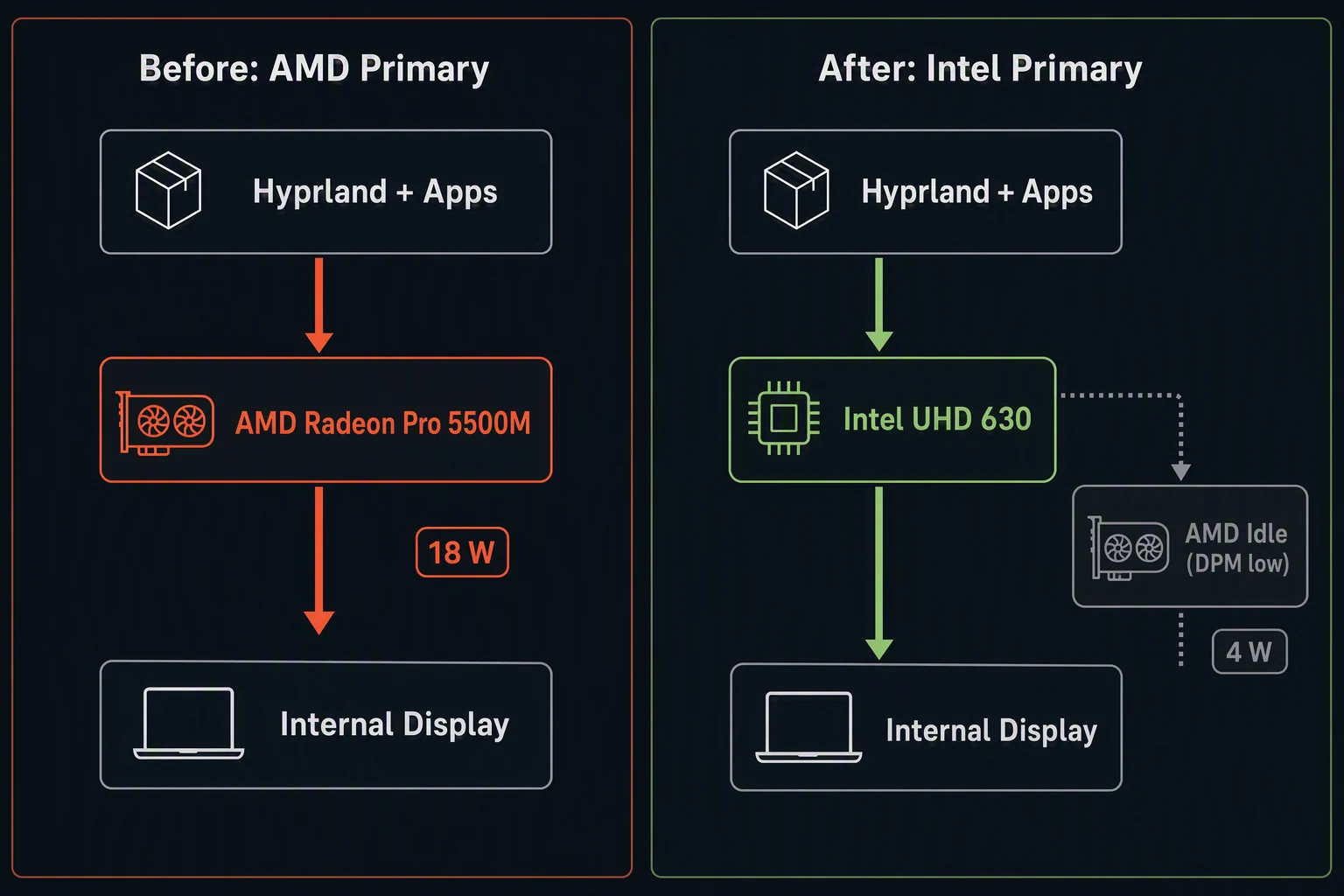
Here’s the result so far:
| Area | Before | After |
|---|---|---|
Default VGA device (boot_vga) | AMD Radeon Pro 5500M | Intel UHD Graphics 630 |
| Connected internal display | AMD card2-eDP-1 | Intel card1-eDP-1 |
| Hyprland renderer | AMD | Intel |
| Desktop DRM access | Most applications had AMD open | Observed applications had only Intel open |
| AMD DPM | auto | low |
| AMD reported activity | 14% | 0% |
| AMD reported power | 18 W | 4 W |
| AMD temperature | 67°C | 52°C after settling |
| System power profile | performance | balanced, remembered for AC and battery |
| Phantom monitor | Active 0×0 eDP-2 | Disabled |
| Runtime GPU switcher | supergfxd Hybrid mode | Disabled |
That’s a 14 W reduction in reported AMD GPU power during my samples. Your numbers may differ based on workload, screen brightness, and the apps you run, but moving the desktop to Intel made a huge difference on this machine.
Testing a Second Display
I eventually plugged in an LG UltraGear through USB-C. The kernel detected it on AMD’s DP-5 connector and read its name, modes, and display identification data correctly. The monitor stayed blank because Hyprland had started with only Intel in AQ_DRM_DEVICES.
Copilot CLI created a second stable alias:
# /etc/udev/rules.d/71-amd-dgpu.rules
SUBSYSTEM=="drm", KERNEL=="card[0-9]*", KERNELS=="0000:03:00.0", SYMLINK+="dri/amd-dgpu"
It then kept Intel first and saved AMD as the secondary display device:
export AQ_DRM_DEVICES=/dev/dri/intel-igpu:/dev/dri/amd-dgpuThe planned logout was interrupted, but reloading the udev rules generated a device event that caused the running compositor to open AMD’s card2. The LG came to life on DP-5, the MacBook panel stayed on Intel eDP-1, and phantom eDP-2 remained disabled. Because Hyprland never restarted, its process still had the original Intel-only environment. The two-GPU value is saved for the next graphical login, but that startup path remains unverified.
The automatic configuration looked right at 3840×2160, 30 Hz, and 1.6 scaling. A brief 2560×1440, 60 Hz test broke application scaling, so I removed the override and reconnected the monitor. It returned to the original working mode. The higher refresh rate sounded better, but the usable desktop mattered more than one number in a mode list.
The reconnect test produced these readings:
| Measurement | Result |
|---|---|
| Active displays | MacBook eDP-1 plus LG DP-5 |
| LG mode | 3840×2160 at 30 Hz, scale 1.6 |
| AMD DPM | low |
| AMD quiet power | 4 W |
| AMD sampled power while active | 4–9 W |
| AMD quiet activity | 2% |
| AMD temperature | 56°C |
| System battery discharge during a quiet sample | 44.3 W |
The 44.3 W system reading needs context. AMD had already returned to 4 W, but Intel was running at its maximum reported GPU frequency. Aquamarine was rendering on Intel and copying frames to AMD for the external output. Driving two high-resolution displays across two GPUs costs power even when AMD stays at its lowest performance level.
The AMD driver also logged several Adding stream ... failed with err 28 messages for a few seconds during connection. The LG still activated, and I found no timeout, GPU reset, page fault, SMU failure, or SDMA failure afterward. Unplugging and reconnecting in the same Hyprland session worked.
This proves the built-in display and one external monitor can work together on this machine. It doesn’t prove that two or three external monitors will work, and I haven’t tested suspend, closed-lid use, or a complete login with the saved two-GPU device list yet.
Where Copilot CLI Helped the Most
I could’ve copied a few snippets from a search result, rebooted, and hoped they worked. I probably would’ve followed the wrong bootloader instructions and assumed balanced was persistent when it wasn’t.
Copilot CLI measured the machine first, checked the proposed changes against its hardware, found the earlier AMD reset, and recognized that this installation used Limine rather than GRUB. It created the rollback script, recovered from the interrupted authorization flow, found the phantom monitor, and traced Omarchy’s power-profile behavior. After each of the two reboots, I reopened the same session and continued without reconstructing the work or guessing which check came next.
What Still Needs Testing
The internal display and normal desktop path are working, the configuration survived a second reboot, and one external monitor works alongside the MacBook panel. I still want to validate:
- suspend and resume
- battery discharge over a longer period
- a complete logout and login with the saved Intel-plus-AMD display profile
- a second external monitor
- docked use with the lid closed
I’m keeping those as separate tests because each one introduces different display and power behavior. I don’t want to say they work until I’ve tried them on this machine.
There’s also one lower-level issue left. During boot, the AMD driver still probes its phantom eDP-2 connector. It logs errors while trying to read the display’s identification data (EDID) and add a display stream for it. Disabling the connector in Hyprland removes the fake monitor, but it doesn’t remove it from the AMD driver’s view inside the kernel. A full fix may require a model-specific kernel workaround. Normal desktop use has been stable so far, AMD is idle at 4 W, and Hyprland no longer treats the phantom output as active, so I decided not to experiment with an undocumented kernel change.
Try the Same Process on Your Laptop
The files and settings in this post are specific to my 2019 16-inch MacBook Pro (MacBookPro16,1) with Intel UHD Graphics 630 and AMD Radeon Pro 5500M GPUs. Someone with a different model, GPU combination, bootloader, or desktop environment shouldn’t copy my PCI addresses, card1 and card2 values, kernel options, or AMD power service.
What is reusable is the process: identify the hardware, measure the current behavior, research the exact model, make one reversible change at a time, and verify the result. Here’s a shorter prompt that preserves those guardrails:
My Linux laptop is running hot and/or draining its battery faster than
expected. Investigate whether GPU routing or power management is contributing,
then propose a safe and reversible fix for this specific machine.

Start with read-only diagnostics. Don't copy PCI addresses, DRM card numbers,
sysfs paths, kernel options, or power settings from another computer. Don't
make privileged changes, disable services, rebuild boot files, or reboot until
you show me the findings and I approve the plan. Stop if the detected hardware
doesn't match the proposed solution.

Identify:

1. The exact model, firmware identifier, distribution, kernel, and any
   hardware-specific patches.
2. Every GPU's PCI address, vendor/device IDs, driver, stable DRM card and
   render identities, boot_vga state, and connected outputs.
3. Which GPU owns the internal panel, performs scanout, and renders the
   desktop; which DRM devices applications have open; and which compositor,
   session manager, environment variables, and GPU-switching services control
   those choices. An open device is access, not proof of submitted work.
4. The bootloader and whether changes must enter an initramfs, unified kernel
   image, or another boot arrangement.
5. CPU and GPU power settings; GPU activity, power, temperature, and sensor
   units; AC or battery state; and relevant journal warnings, display errors,
   timeouts, or resets.

Capture those results in a baseline table. Research the exact model, GPU
combination, kernel, and distribution, preferring official documentation and
same-model evidence. Separate confirmed facts from assumptions and explain
unfamiliar terms.

Before changing anything, explain the problem, whether GPU routing contributes
to it, the proposed stages, risks, untested scenarios, affected files and
services, correct boot-image process, and graphical-session rollback plan.

If I approve the implementation:

- Back up each changed file and create the rollback script first.
- Use stable hardware identities rather than card numbers.
- Apply the smallest low-risk change first.
- Verify display routing before changing discrete-GPU power.
- Don't force a power state without support from this exact hardware and
  driver. Add model, device, and runtime-topology guards where needed.
- Include every GPU that drives a connected monitor in the compositor device
  list.
- Ask before rebooting. Afterward, verify the current boot and compare it with
  the baseline rather than trusting saved state.

Verify the final VGA, panel, scanout, and renderer routing; observed DRM access;
GPU mode, activity, power, and temperature; persistent system power profile;
kernel and service errors; phantom displays; and rollback readiness. Test
external displays, suspend/resume, battery use, and docked use separately.
Success requires changed behavior and measurements, not just the expected text
in a configuration or sysfs file.
Depending on the hardware, the result may be completely different from mine. Copilot CLI might recommend using the discrete GPU only for selected applications, allowing an idle GPU to enter a lower-power state, configuring a GPU-switching service such as switcheroo-control or supergfxd, changing a firmware setting, or making no GPU-routing change at all. The important part is that it starts with the machine in front of it instead of forcing a MacBook-specific solution onto different hardware.
Final Thoughts
AMD dropped from 18 W to 4 W in my internal-display tests, the desktop now runs on Intel, and the rollback script is ready if anything goes wrong. The MacBook panel and one external LG also work together. AMD remained at low and returned to 4 W, although the two-display setup used much more total power because Intel rendered the desktop and copied frames to AMD.
I still have suspend, longer battery, closed-lid, and additional external-monitor testing to do, but the original power problem is in a much better place. Best of all, I can finally use the machine on my lap without reaching for the oven mitts.